Tuesday, May 20, 2014

PowerPoint Overload

There have been many times when I have needed to present information in an engaging manner. Sure, the classroom is one place, but teacher training is another.  I've been to presentations where the presenter actually reads directly from the slides of the presentation, word for word.  Yawn! Today there are many tools available for presentations, yet many educators continue to rely on Microsoft PowerPoint.
I read an article entitled, Death by PowerPoint, and am not surprised at the number of tutorials and how to's that cover PowerPoint use and overuse.  It seems that many have relied on PowerPoint for sharing information both in education and in business.  It is interesting to note that panic often sets in when the projector fails to work. Heaven forbid the individual would need to adjust their presentation! (Those in the 'know' always have a back up plan.)
On a recent flight to San Francisco, the gentleman beside me spent nearly all of his time working on a PowerPoint presentation.  He was adding slides, deleting slides, adding graphics, attempting to add animation and more.  Whenever one presents, they need to keep their audience in mind.  In a school setting, do all core subject teachers use PowerPoint during the course of the day?  Is there such a thing as PowerPoint overload?
I've heard the word PowerPoint used in place of the word presentation.  PowerPoint is a Microsoft product.  It is a presentation tool.  As mentioned above, there are many presentation tools available.  Keynote is Apple's presentation tool and comes standard with any Mac purchased.  Google Slides is a presentation tool and offers the ability to collaborate on the presentation.
One way to integrate technology into your presentation is to use Padlet (32 interesting ways to use Padlet (Wallwisher) in your classroom).  Present a question to your "audience" and have participants respond using Padlet.
Have you ever shared electronic files?  You would be able to create files of graphics, journal articles, assignments, class directions and procedures and so many more items. Those students that need a print copy have the opportunity to have one on their own.  Students that need to enlarge text can do so when the files are shared electronically.
Create zooming presentations with Prezi. Create online course work using Edmoto or Moodle. Utilize Evernote. Dare to motivate and captivate your audience by offering variety to your presentations.

Saturday, May 17, 2014

Virtual Field Trips

Field trips are a time consuming endeavor.  It takes time to plan, make curriculum connections, tend to individual student needs (medications), collect money and permission slips and more.  I’d much rather enjoy a virtual field trip. The internet makes it possible to ‘travel’ to new places with a click of the mouse.
I’ve used Google Earth to show students the location of their school.  When speaking about a part of the country or world, Google Earth literally brings the world within reach to the kids.  Students truly see the world as it is.  Jerome Burg is the founder of Google Lit Trips and brings a whole new understanding to literature through these downloadable lessons.
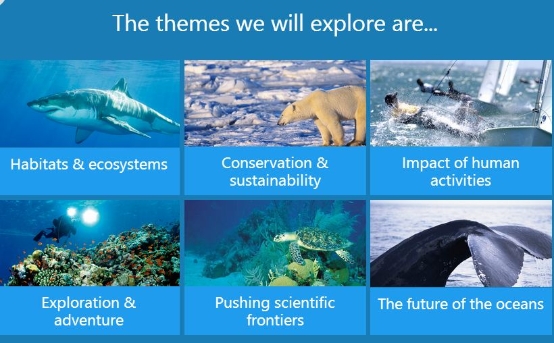
Using Skype last year for an author talk was a wonderful experience.  Students read the book, The Bystander by James Preller, and a Skype conference call was arranged where selected students interacted with Mr. Preller while the conference was broadcast for the entire school. Exploring Oceans is the feature for the month of November 2013.
exploreoceans.JPG
The National Parks electronic field trip program allows students to visit various parks that they might never travel to.  Lesson plans are available to educators.

Additional
Parent & Afterschool Resources | Grades   3 – 5  |  Activity & Project
Can't make it to a zoo? Observe animal habits and habitats using one of the many Webcams broadcasting from zoos and aquariums around the United States and the world.
Classroom Resources | Grades   K – 2  |  Lesson Plan  |  Standard Lesson
3, 2, 1... Blast off! Students learn new vocabulary by taking a virtual field trip to the moon, read-alouds, creating a picture dictionary, and completing a final writing activity.
Classroom Resources | Grades   3 – 5  |  Lesson Plan  |  Recurring Lesson
Students observe animals using one of the many webcams broadcasting from zoos and aquariums around the United States and the world, with a focus on observation, discussion, questioning, and research.

360º Panorama Views

History and Constitution Day


Constitution Day Resources

From EDSITEment:


Poster Contest:


From Digital History:
http://www.digitalhistory.uh.edu/

iPad Resources


This is a resource collection of information on iPads and their use in the classroom.
Kindle for iPad (good chance to read Classics)
Reflection app that will mirror the iPad for presentation
iPads in the Classroom by Kathy Shrock
iPads for Beginners: Thinkfinity Webinar

Friday, May 16, 2014

Learning Science


sciencekids.JPG

Science for Kids is a web offering of rich, content related material and resources for class instruction. There are fun activities, experiments, videos, quizzes, science fair project information and more.  What a great site to help motivate students to learn science and enjoy it! At this time there are 30 posted topics including animals, weather, space, and physics.  The homepage of the site is like a feast at a smorgasbord, so many things to choose from, not knowing where to start.  This site also offers science related images that are free to use for class projects and presentations.


makemegenius.JPGAnother good site for science instruction is Makemegenius.com and is mainly for grades 1-7. Resources offered include PowerPoint presentations on topics like:plants, animals, and the solar system. Ready to use resources are so appreciated by educators.  The PowerPoint presentations download to your computer and are able to be edited.  You will also find cool facts, videos, and assessment items.


exploratorium.JPGExploratorium is an online opportunity to explore various science topics which include, among others,  astronomy & space, culture, human body, and listening.  The interactive nature of this site is a plus for use in class and for differentiating instruction.
Sciencenetlinks.JPG
Science NetLinks: Resources for Teaching Science, offers many resources for teaching science. Lessons and tools are provided for K-12.  Use Science Updates for students to practice reading text for information.
As an educator in today's world, using a variety of resources, whether it is printed, video, presentations, or online gaming, can help promote science education and make learning science fun.

STEM Lessons

Teacher's recommend these useful links to STEM related topics.

Power Up!
Invention at Play
Science Updates
Science Tools
Planet Size Comparison
Make a Mission
Jean Craighead George

Simulations


Recently discovered this resource phET Simulations ,which due to FLASH and Java don't work well with iPads. In fact, the website offers a nice FAQ and in it state: "We recommend laptops or netbooks with a minimum of 1024x800 screen resolution for using our simulations. "


Simulations are varied and include physics, chemistry and math, as well as other subjects. 


Players collectively take on the role of astronauts navigating and exploring the structure of the space station in Spacewalk.